About CAME Domotic 3.0
Domotic 3.0 - The app for controlling the CAME home automation system. Domotic 3.0 lets you manage all the functions of the Came home automation system via a simple, intuitive graphical interface. You browse simple...
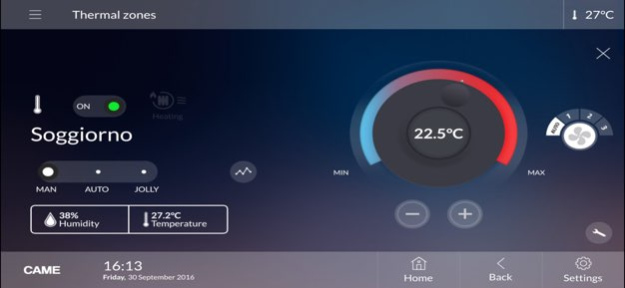
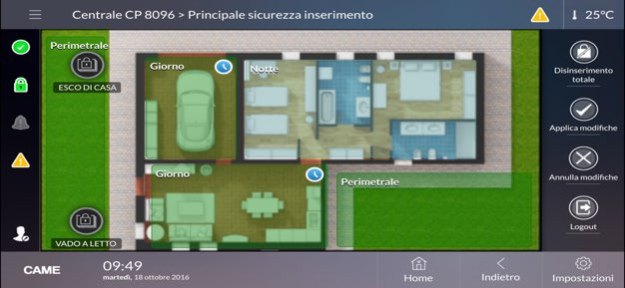
Domotic 3.0 - The app for controlling the CAME home automation system. Domotic 3.0 lets you manage all the functions of the Came home automation system via a simple, intuitive graphical interface. You browse simple functions or graphic-map menus. These recreate images of the various rooms around your home. All of the functions featured in the system, like operator management, thermostat control, lighting control, shutter or awning opening and closing, burglar alarm control and scenario management, are readily available to users via the portable device on which Domotic 3.0 is installed.
Previous Versions
Here you can find the changelog of CAME Domotic 3.0 since it was posted on our website on 2016-10-15 02:32:27.
The latest version is 3.6.0 and it was updated on 2026-10-12 21:00:35. See below the changes in each version.
CAME Domotic 3.0 version 3.6.0
Updated At: 2026-10-08
Changes: Version History - Improved push notification handling 3.6.0 03/06/2025 - Added support for newer operating system versions. 3.5.2 10/10/2023 - Fixed PXC2 security panel alarm video visualization.
- Fixed problem of loads control page not loading correctly. 3.5.1 10/18/2022 - Improved thermoregulation control.
- New icon for active timers.
- Fix missing tiles in function page.
- Other minor fixes and improvements. 3.5.0 04/15/2022 - Improvements in remote connection handling.
- New app icon.
- Other minor fixes and improvements. 3.4.0 03/15/2021 - Added option in 'Settings -> Advanced settings -> Use alternative cloud proxy' to solve connection problems with some mobile operators (must be set to 'yes').
- Improvements in thermoregulation handling and control.
- Other minor fixes and improvements. 3.3.0 10/09/2020 - Support added for the new PXC2 anti-intrusion control panels.
- Support added for push notifications with PXC2 anti-intrusion control panels.
- Audio volume adjustment added for anti-intrusion scenarios.
- Anti-intrusion voice messages added in Russian.
- Portuguese language support added.
- New look & feel in line with the new CAME brand.
- Bug fixes and performance improvements.
The update will delete the account configurations in the app.
Please reconfigure the app after updating. 3.1.2 08/02/2019 - Added support for the new PXC2 anti-intrusion control panels.
- Added support for push notifications with PXC2 anti-intrusion control panels.
- Added audio volume adjustment for anti-intrusion events.
- Added anti-intrusion vocal messages in Russian.
- Added Portuguese language support.
- New look & feel aligned with the new CAME brand.
- Bugfixes and improvements. 3.1.1 07/24/2019 Added support for new thermoregulation parameters.
Security and thermoregulation bugfixes. 2.1.1 10/12/2017 - Customizable controls and scenarios icons
- Visualization of home automation scenarios status
- Icons in maps can be readonly or without description
- Security panels object can be placed in home automation maps
- Possibility to edit a saved connection account
- Signalling of home automation plant scanning
- New security user interface with multi panel support
- Visualization of video verification pre-trigger photos 1.6.1 11/07/2016 New features in version 1.5.3:
- Cameras and relays icons on home automation maps.
- Configuration of multiple accounts (both local and CAME Connect).
- Technical alarms.
- Irrigation.
- User custom scenarios.
- Home automation and security mixed scenarios.
- Shutters open/close percentage and slats control.
- Video verification functionality for security plants.
- Possibility to automatically view a camera when a security alarm occurs.
- Bugfix and improvements. 1.5.3 06/10/2016 New features in version 1.4.9:
- Added connectivity support with security modules 001SIGPRS / PXGPRS
- Bugfix and improvements 1.4.9 04/26/2016 New features in version 1.4.5:
- Remote management of one or more home automation systems via the Came cloud
- Remote viewing of camera images
- Sound system control
- Viewing of water and gas consumption
- Viewing of signals originating from analogue inputs
- Viewing of outdoor temperature
- Bug fixes and improvements 1.4.5 11/24/2015 New features in version 1.3.5:
- Loads control
- Energy stats and comparation
- RGB lights control
- Bugfix and improvements 1.3.5 07/28/2015 Lots of improvements and bugfixes. 1.2.8 03/05/2015 1.2.4 02/25/2015
CAME Domotic 3.0 version 3.6.0
Updated At: 2025-03-06
Changes: Mar 6, 2025
Version 3.6.0
- Improved push notification handling
CAME Domotic 3.0 version 3.6.0
Updated At: 2025-03-06
Changes: - Improved push notification handling
CAME Domotic 3.0 version 3.5.2
Updated At: 2023-10-10
Changes: Oct 10, 2023
Version 3.5.2
- Added support for newer operating system versions.
CAME Domotic 3.0 version 3.5.1
Updated At: 2022-10-18
Changes: Oct 18, 2022
Version 3.5.1
- Fixed PXC2 security panel alarm video visualization.
- Fixed problem of loads control page not loading correctly.
CAME Domotic 3.0 version 1.5.3
Updated At: 2015-02-25
Disclaimer
Official App Store Link
We do not host CAME Domotic 3.0 on our servers. We did not scan it for viruses, adware, spyware or other type of malware. This app is hosted by Apple and passed their terms and conditions to be listed there. We recommend caution when installing it.
The App Store link for CAME Domotic 3.0 is provided to you by apps112.com without any warranties, representations or guarantees of any kind, so access it at your own risk.
If you have questions regarding this particular app contact the publisher directly. For questions about the functionalities of apps112.com contact us.